Can I Create a Custom What3Words Address?
Many people ask if they can create their own custom What3Words address, like ///smith.family.home or ///best.coffee.shop. The short answer is: No, you cannot change the words.
What3Words uses a fixed grid where every 3-metre square in the world has been pre-assigned three random words. These are permanent and cannot be moved or edited.
However, there is a trick.
Because your home or business covers a large area, it actually sits on dozens of different squares. While you can't change the words, you can choose which square you use.
Our Grid Finder tool below helps you scan every square on your property to find the one with the most "custom" feel—whether that is professional, memorable, or just easy to spell.
Why Your Property Has Multiple What3Words Addresses
What3Words has become a popular way to pinpoint precise locations across the UK. Whether you’re sharing directions with friends, helping delivery drivers find your front door, or choosing a memorable tag for your business, a good What3Words address can make life much easier.
But here’s something most people don’t realise: your home, shop, office or property doesn’t have just one What3Words address — it has dozens.
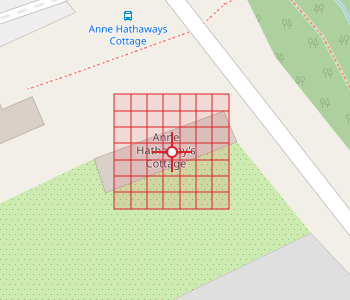
Every What3Words square is only 3 metres by 3 metres, so even a small house or shop spans multiple squares, each with its own unique three‑word combination.
That’s where our What3Words Grid Finder comes in. Instead of showing you just one square, it displays 25, 49 or 81 nearby squares at once, helping you choose the most memorable or practical address for your needs.
A typical UK home covers several What3Words squares. Your:
- front door
- driveway
- garden
- parking space
- side gate
- garage
A business has even more variation:
- main entrance
- staff entrance
- loading bay
- customer parking
- delivery drop‑off point
- outdoor seating or signage areas
You Can’t Choose the Words — But You Can Choose the Square
What3Words assigns fixed words to every square on Earth. You can’t create your own phrase like ace.bike.shop.
But you can choose which square represents your location.
By exploring the squares around your property, you can often find something:
- more memorable
- more professional
- fun or brand‑friendly
- easier to say aloud
How the 5×5, 7×7 and 9×9 Grids Work
You can choose from three grid sizes:
- 5×5 Grid (25 squares) — a quick overview of the immediate area.
- 7×7 Grid (49 squares) — the most popular option.
- 9×9 Grid (81 squares) — ideal for the widest selection of words.
Drag the map so the crosshair sits over your home or business, then generate the grid. Each square shows a different What3Words address. Move the map slightly to reveal even more options.
How to Choose the Best What3Words Address
1. Choose something easy to say aloud
You’ll often share your What3Words address verbally, so avoid awkward or confusing words.
2. Pick something memorable
For example, a bike shop might find something like:
- ///pedal.corner.ready
- ///cycle.handy.spot
- ///bikes.tuning.place
3. Match the square to the actual entrance
This avoids confusion for couriers, customers or emergency services.
4. Avoid anything unprofessional
If a combination looks odd or inappropriate, simply choose another square.
5. Consider how it looks in print
Especially important for signage, websites and business cards.
Example: Same shop, very different squares
If you stand outside the Apple Store in Knightsbridge and open What3Words, the first square you land on might not be especially flattering. In fact, one of the squares right outside the entrance is:
///toxic.scope.cowboy
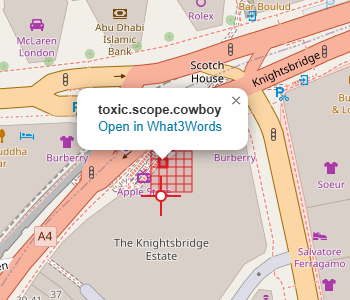
It’s fair to say that if you owned a premium retail brand, this probably wouldn’t be the one you’d rush to print on your signage.
But wander just a few metres across the forecourt and the tone changes entirely. Another square covering the very same shop is:
///luxury.bill.paying
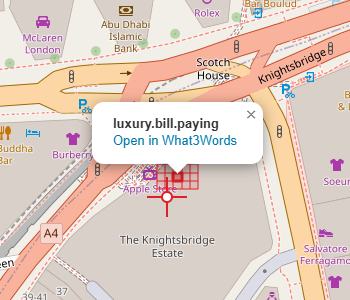
Suddenly it all feels rather Knightsbridge again.
The point is simple: every property sits on dozens of these little squares, and some will suit you far better than others. It’s worth having a quick look around before you decide which one to use.
How to Use the What3Words Grid Finder
- Open the What3Words Address Finder on our site.
- Drag the map so the crosshair sits over your property.
- Select a grid size: 5×5, 7×7 or 9×9.
- Click Generate Grid.
- Browse the list of 3‑word addresses.
- Click any square to highlight it on the map.
- Move the map slightly to generate more options.
Within seconds, you’ll have dozens of possible What3Words addresses to choose from.
Final Thoughts
You don’t need to settle for the first What3Words address you see. Your home or business sits on many different squares, and some will be far more memorable, professional or practical than others.
By using a 5×5, 7×7 or 9×9 grid, you can explore all the nearby options and choose the one that suits you best.
Find Your What3Words Address
Enter your postcode below to explore all the What3Words squares around your home or business.